DICE.fm

Events

How a secure impersonation feature transformed client support and onboarding

I designed a secure account impersonation feature for DICE's B2B platform, replacing a risky credential-sharing workaround with a compliant, auditable solution that protected both users and the business.
Role

Role

Product Designer

Product Designer

Timeline

Timeline

6 weeks

6 weeks

Team

Team

  • Designer (Me)

  • PM

  • Front-end Engineer

  • Back-end Engineer

  • UX Writer

  • QA Tester

  • Designer (Me)

  • PM

  • Front-end Engineer

  • Back-end Engineer

  • UX Writer

  • QA Tester

Platform

Platform

SaaS Web App

SaaS Web App

OVERVIEW

The problem

In their daily work, Client Success agents and Account Managers were creating alias accounts, replicas of client accounts that allowed them to respond to troubleshooting requests and train clients on MIO. With over 1,000 alias accounts in existence, the workaround had grown into a significant liability:

  • Alias accounts were time-consuming to create and posed a major risk of data breaches

  • They compromised business reporting accuracy, making a replacement essential

The problem

In their daily work, Client Success agents and Account Managers were creating alias accounts, replicas of client accounts that allowed them to respond to troubleshooting requests and train clients on MIO. With over 1,000 alias accounts in existence, the workaround had grown into a significant liability:

  • Alias accounts were time-consuming to create and posed a major risk of data breaches

  • They compromised business reporting accuracy, making a replacement essential

The solution

A secure impersonation feature. Unlike alias accounts, a user impersonation feature allows a privileged account to see exactly what another user sees on the same screens when they log in, without creating a separate account. It is primarily used for support purposes, giving agents the ability to assist clients directly within their actual account environment.

The solution

A secure impersonation feature. Unlike alias accounts, a user impersonation feature allows a privileged account to see exactly what another user sees on the same screens when they log in, without creating a separate account. It is primarily used for support purposes, giving agents the ability to assist clients directly within their actual account environment.

OUTCOMES

458

458

458

Sessions recorded in the first 4 months after launch, confirming strong and immediate adoption.

Sessions recorded in the first 4 months after launch, confirming strong and immediate adoption.

40+

40+

40+

Internal team members now able to troubleshoot client issues and deliver real-time training without relying on alias accounts.

Internal team members now able to troubleshoot client issues and deliver real-time training without relying on alias accounts.

Client trust

Client trust

Client trust

A transparent, trackable flow replaced risky workarounds, reducing data breach risks and improving client onboarding and satisfaction.

A transparent, trackable flow replaced risky workarounds, reducing data breach risks and improving client onboarding and satisfaction.

RESEARCH & DISCOVERY

Workarounds, gaps and hidden needs

Through interviews, workshops and stakeholder sessions with Client Success and Account Managers, I mapped how alias accounts were being used and uncovered key workarounds: agents comparing views across tabs in incognito mode, and troubleshooting from their own accounts which limited client visibility.

Two additional requirements also emerged: Activity Logs for client users to track changes made on their behalf, and surfacing impersonation usage data in Looker.

Through interviews, workshops and stakeholder sessions with Client Success and Account Managers, I mapped how alias accounts were being used and uncovered key workarounds: agents comparing views across tabs in incognito mode, and troubleshooting from their own accounts which limited client visibility.

Two additional requirements also emerged: Activity Logs for client users to track changes made on their behalf, and surfacing impersonation usage data in Looker.

Workshop done in Figjam

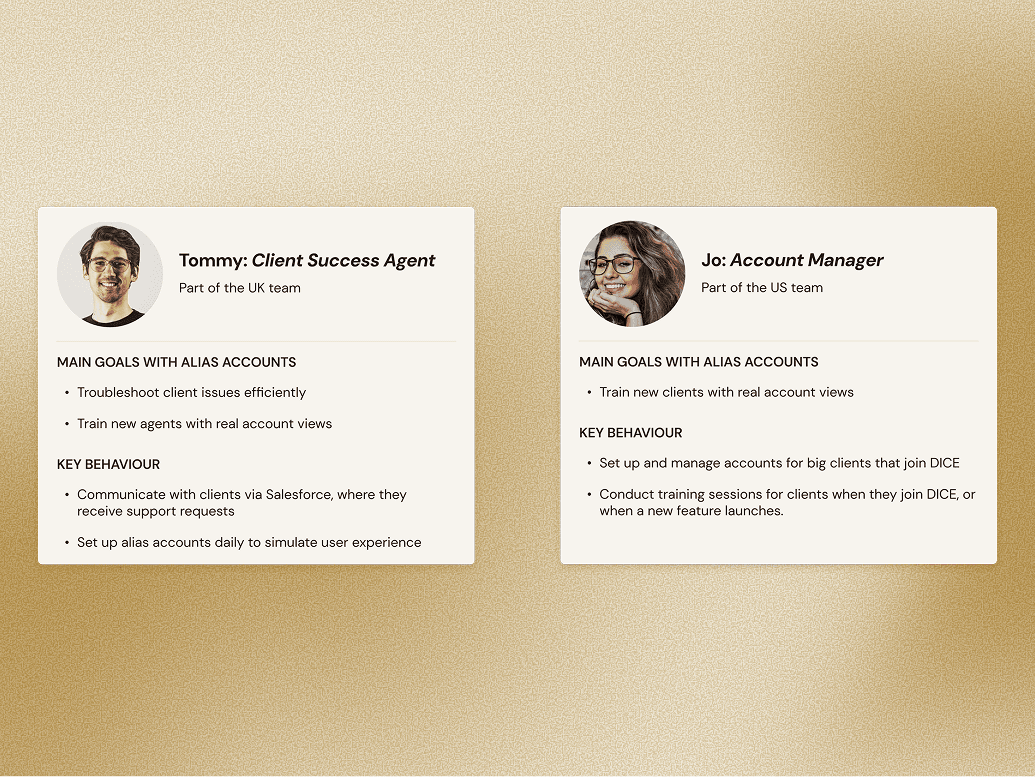
To clarify who the users were in the context of this project, I created quick personas for both teams.

To clarify who the users were in the context of this project, I created quick personas for both teams.

UX STRATEGY

At this stage, our Product Manager became less available and eventually stepped away from the project for a couple of months. I took on the responsibility of leading the project forward, with part-time support from the Product Manager of another team.

I mapped my areas of focus and open questions in FigJam, then I discussed with the cross-functional team to clarify priorities and assess feasibility. The five focus areas were:

  • Touchpoints

  • Search for a client

  • Functioning of the feature

  • Access and permissions

  • Activity Log

A transparency and trust challenge

One user request gave me pause: some agents felt clients should not know their workspace was being accessed.
I pushed back on this. Data protection was one of the core reasons this project existed in the first place, and building a solution that didn't respect client privacy would undermine the very problem we were trying to solve. I saw this as an opportunity to build trust with our external B2B users rather than erode it.

We decided to anchor our requirements around transparency, legality and trust building, and reached out to the Legal team to get the precise legal details the feature would need to include.

Requirements

After analysing the findings and focus areas, we defined the key requirements for the feature:

At this stage, our Product Manager became less available and eventually stepped away from the project for a couple of months. I took on the responsibility of leading the project forward, with part-time support from the Product Manager of another team.

I mapped my areas of focus and open questions in FigJam, then I discussed with the cross-functional team to clarify priorities and assess feasibility. The five focus areas were:

  • Touchpoints

  • Search for a client

  • Functioning of the feature

  • Access and permissions

  • Activity Log

A transparency and trust challenge

One user request gave me pause: some agents felt clients should not know their workspace was being accessed.
I pushed back on this. Data protection was one of the core reasons this project existed in the first place, and building a solution that didn't respect client privacy would undermine the very problem we were trying to solve. I saw this as an opportunity to build trust with our external B2B users rather than erode it.

We decided to anchor our requirements around transparency, legality and trust building, and reached out to the Legal team to get the precise legal details the feature would need to include.

Requirements

After analysing the findings and focus areas, we defined the key requirements for the feature:

1-

The impersonation feature is located in the Promoters section of MIO

2-

An email notification is sent to the client when impersonation starts

3-

Impersonation happens in the live environment

4-

The person impersonating can see at all times that they are in the process of impersonating

5-

Changes are displayed on both the client's and DICE staff's Activity Logs, with the name of the impersonator

6-

No mobile version, to reduce the risk of accidental changes to a client's account

EXPERIENCE DESIGN

Mapping the better path

To kick off the design phase, I mapped the ideal impersonation flow against the existing alias account process, making the case for a more streamlined experience immediately visible.
In parallel, I reached out to the data team to request Looker tracking of impersonation usage from day one, ensuring the team would have meaningful data on agent behaviour from the moment the feature launched.

To kick off the design phase, I mapped the ideal impersonation flow against the existing alias account process, making the case for a more streamlined experience immediately visible.
In parallel, I reached out to the data team to request Looker tracking of impersonation usage from day one, ensuring the team would have meaningful data on agent behaviour from the moment the feature launched.

User flow for starting an impersonation session

User flow for starting an impersonation session

From exploration to high fidelity

I explored mid-fidelity designs in close collaboration with the UX Writer, with copy and design evolving in parallel to keep the experience coherent at every stage.
Feedback gathered across one design critique and three cross-functional sessions sharpened both the flow and visual direction, before I translated everything into a high-fidelity prototype ready for usability testing.

Usability testing

The starting point of the impersonation session was well received. Users came in with different assumptions about where to find the feature, but agreed that the Promoters section made sense, since that is where they look for details on specific clients within a promoter company.

The starting point of the impersonation session was well received. Users came in with different assumptions about where to find the feature, but agreed that the Promoters section made sense, since that is where they look for details on specific clients within a promoter company.

More significantly, 5 out of 9 users did not understand where to start the flow or how to search for a customer. They expected a dedicated customer-focused section in the main navigation rather than finding it within the Dashboard.

More significantly, 5 out of 9 users did not understand where to start the flow or how to search for a customer. They expected a dedicated customer-focused section in the main navigation rather than finding it within the Dashboard.

New and adapted components

To meet the specific needs of this project, I created and adapted several components:

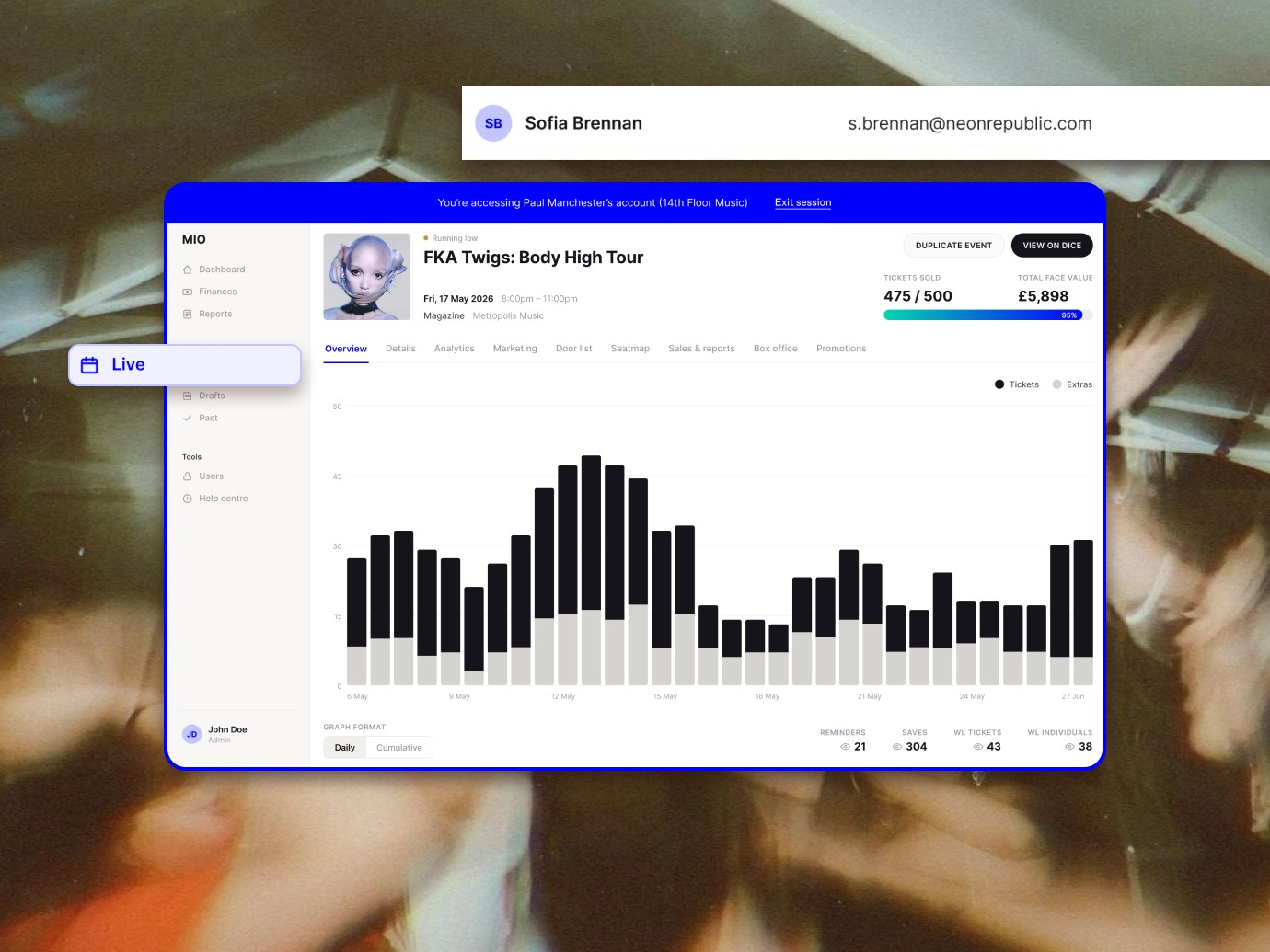
  • A banner around the screen indicating that the user is in an active Account Access session

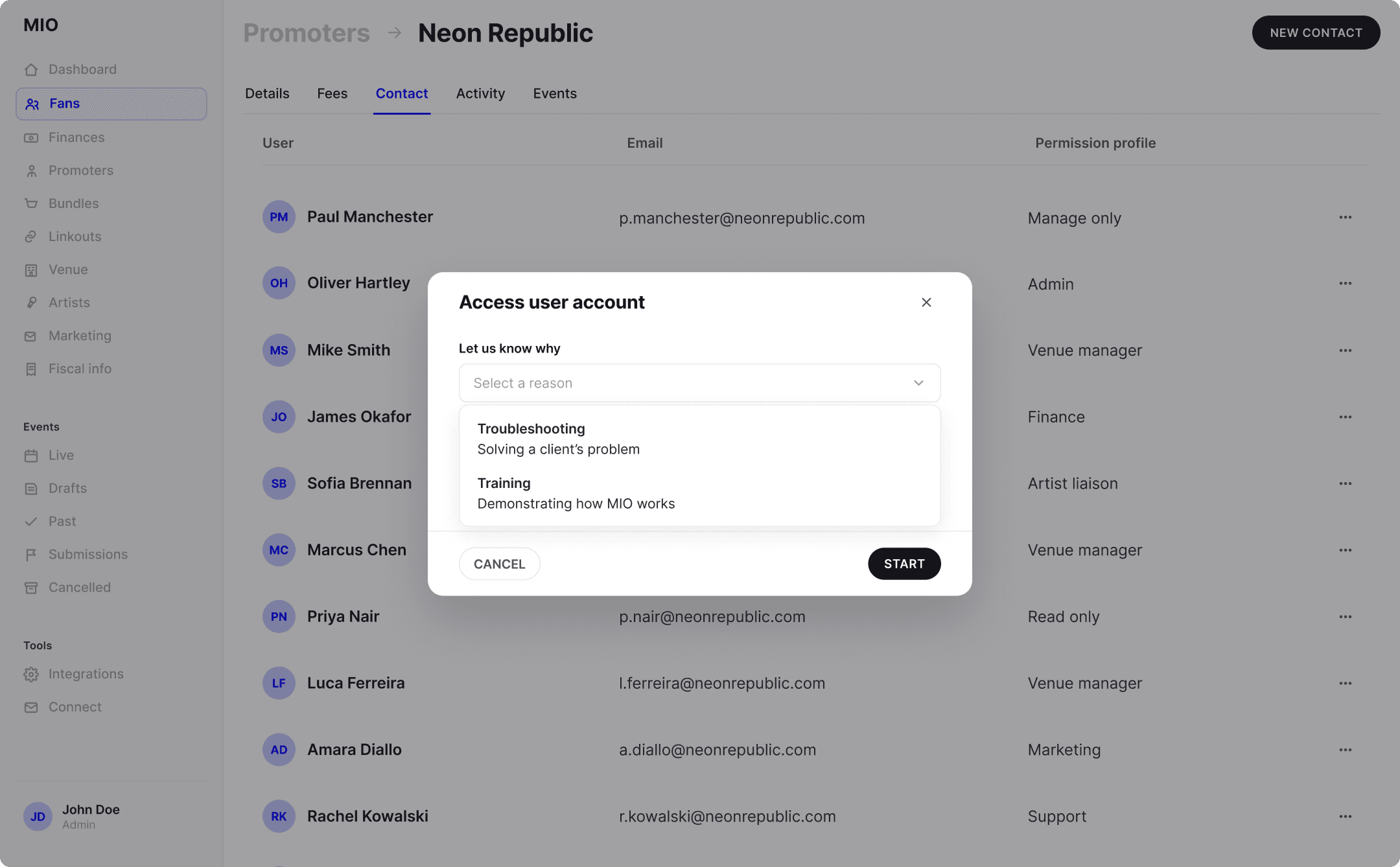
  • A modal for reason selection, incorporating copy from the Legal team and UX Writer

  • An email template notifying the client when a DICE agent initiates an Account Access session

DELIVERY

Usable, safe and transparent

The final solution balances usability, safety and transparency, replacing a risky workaround with a secure, accountable and trust-building experience.

The MVP was presented to the cross-functional team and stakeholders during Sprint Review.

Then, during development, I conducted Design QA during a meeting with the font-end engineer.

EY client using the plugin during a testing session